
Create your account and start the trial
Create an A11yRemedy organisation, confirm your email and start the 14-day Pro trial. No card is needed to start.
Your account belongs to an organisation: your business, or your agency if you look after sites for clients. Everyone you invite later joins the same organisation.
Create the organisation
- Go to app.a11yremedy.com/register.
- Fill in Organisation name, Your name, Email and Password. The password needs at least 8 characters.
- Tick the product emails box only if you want occasional A11yRemedy news. Your account works the same either way.
- Select Create account.
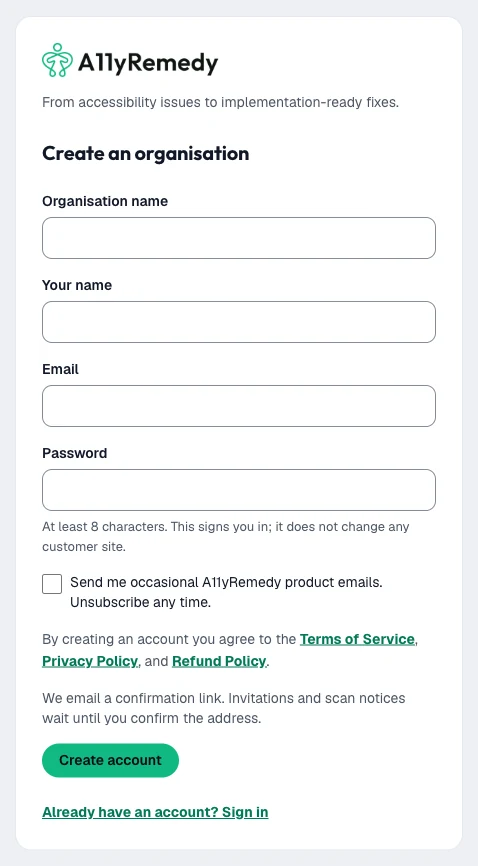
Creating the account means you agree to the Terms of Service, the Privacy Policy and the Refund Policy, which are linked under the form.
Confirm your email
We send a confirmation link to the address you entered. Open it and select Confirm email. Until you confirm, invitations and scan emails wait. You can still add a site and scan while you wait.
Tip
If the link has expired or the email didn’t arrive, sign in and select Send the link again in the banner at the top of the app. Check your spam folder too.
Your trial
Every new organisation starts a 14-day trial of Pro, with no card needed. During the trial you can add up to 3 sites and use every Pro feature, including fixes and weekly or daily scans.
When the trial ends without a paid plan, the organisation moves to Free and keeps its data. Free covers one site, with scans and results; see Trial, Free and Pro for what changes.
Next
Last updated